As an Amazon Associate, we earn from qualifying purchases. Some links on this site are affiliate links at no extra cost to you. Our recommendations are based on thorough research and editorial judgment.

5 Best Video Streaming Encoders for Flawless Live Broadcasts

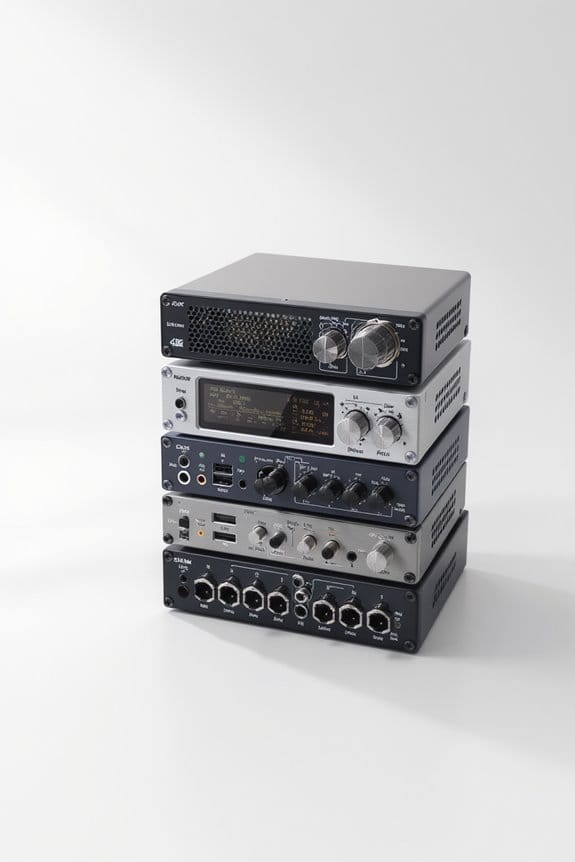
If you’re looking for the best video streaming encoders for flawless live broadcasts, consider options like the H.265 HDMI Video Encoder, which supports high-quality output with low bandwidth. The HEVC H.265 HD Video Audio Encoder offers advanced compression for smooth streaming. Zowietek’s 4K Video Encoder delivers stunning visuals, while the Solo Wireless Encoder provides mobility without sacrificing quality. Finally, the 3G SDI IP Video Streaming Encoder guarantees stable connectivity. Stick around to discover additional features that might suit your needs.
Key Takeaways
- Look for encoders with support for advanced formats like H.265 for high-definition output while minimizing bandwidth usage.
- Ensure the encoder has multi-stream capabilities to broadcast to various platforms simultaneously for wider audience reach.
- Choose encoders that feature customizable settings for video resolution, bitrate, and overlays, allowing for personalized streaming experiences.
- Opt for devices with reliable network connectivity options, such as link bonding and dual connections, to maintain consistent streaming quality.
- Test encoders in different scenarios to verify compatibility with target platforms and audience preferences for the best viewing experience.
| H.265 HDMI Video Encoder for Live Streaming | 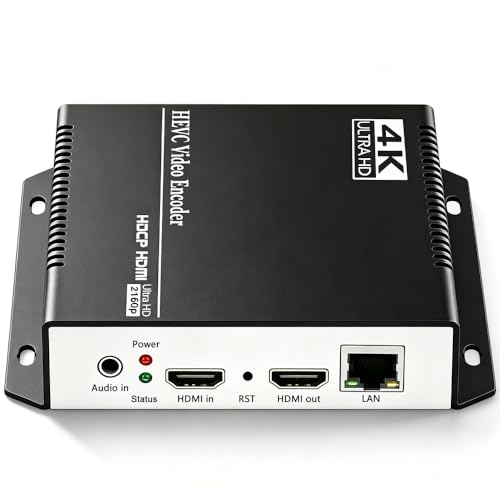 | Versatile Streaming Power | Streaming Protocols: HTTP, RTSP, RTMP(S), SRT, HLS, and more | Live Streaming Capability: Supports live streaming to multiple platforms | Customization Options: Text, logos, customizable parameters | VIEW LATEST PRICE | Read Our Analysis |
| HEVC H.265 HD Video Audio Live Streaming Encoder | 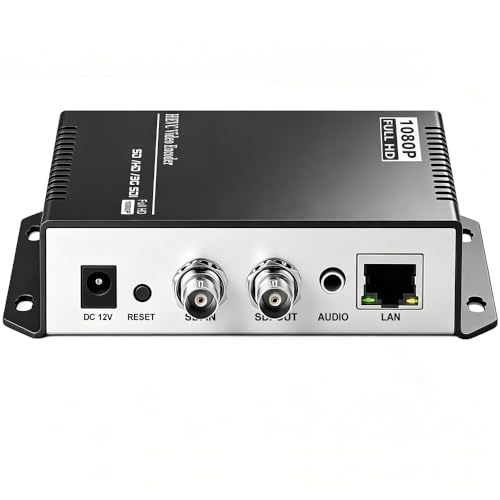 | High-Quality Encoding | Streaming Protocols: HTTP, RTSP, RTMP(S), SRT, HLS, and more | Live Streaming Capability: Ideal for live streaming to various platforms | Customization Options: Text, logos, video manipulations | VIEW LATEST PRICE | Read Our Analysis |
| Zowietek 4K Video Encoder/Decoder for Live Streaming |  | 4K Streaming Champion | Streaming Protocols: SRT, RTMP(S), RTSP | Live Streaming Capability: Real-time streaming to multiple platforms | Customization Options: Flexible video and audio settings | VIEW LATEST PRICE | Read Our Analysis |
| Solo Wireless Live Video Streaming Encoder |  | Wireless Convenience | Streaming Protocols: Customizable streaming protocols | Live Streaming Capability: Direct HD live streaming to multiple platforms | Customization Options: Adjustable visual settings | VIEW LATEST PRICE | Read Our Analysis |
| 3G SDI IP Video Streaming Encoder Decoder |  | Compact SDI Solution | Streaming Protocols: SDI NDI, SRT, RTMP, RTMPS, RTSP | Live Streaming Capability: Streaming in standalone mode support | Customization Options: Control over streaming settings and parameters | VIEW LATEST PRICE | Read Our Analysis |
More Details on Our Top Picks
H.265 HDMI Video Encoder for Live Streaming
Elevate your live streaming game with the H.265 HDMI Video Encoder. If you’re serious about high-quality streaming that’s hassle-free, this device is perfect for you.
Key Features:
- Compact Design: Just 5.12 x 4.13 x 1.1 inches, making it easy to transport.
- Versatile Output: Converts HDMI video to formats for major platforms like YouTube and Twitch.
- Multi-stream Capability: Output up to four simultaneous video streams through protocols like RTMP and HLS.
- Customization Options: Add logos, timestamps, and tailor settings such as resolution and bitrate to suit your needs.
- Lifetime Technical Support: Enjoy free support for as long as you own the device.
- Universal Compatibility: Works seamlessly with HDMI devices to enhance your streaming setup.
Why It Matters:
With the H.265 HDMI Video Encoder, you can deliver stunning, high-quality video content that keeps your audience engaged. Whether you’re a gamer, a content creator, or hosting live events, this encoder empowers you to focus on what you do best—creating amazing content.
Don’t settle for mediocre streaming. Get the H.265 HDMI Video Encoder today and transform your live streaming experience!
- Streaming Protocols:HTTP, RTSP, RTMP(S), SRT, HLS, and more
- Live Streaming Capability:Supports live streaming to multiple platforms
- Customization Options:Text, logos, customizable parameters
- Technical Support:Free lifetime technical support
- Multiple Output Streams:Outputs 4 video streams simultaneously
- Dimensions:5.12 x 4.13 x 1.1 inches
- Additional Feature:Supports HD 1080P/1080i
- Additional Feature:Compact size and lightweight
- Additional Feature:Free lifetime technical support
HEVC H.265 HD Video Audio Live Streaming Encoder
Experience seamless, high-quality streaming with the HEVC H.265 HD Video Audio Live Streaming Encoder. Perfect for content creators and broadcasters, this powerful encoder maximizes your streaming potential. Here’s why you should consider it:
- Stream to Multiple Platforms: Broadcast on up to four platforms at once. Expand your audience like never before.
- Flexible Protocol Support: Utilize various protocols including RTMP, HLS, and SRT, tailored to balance bandwidth and quality for optimal streaming.
- Customizable Streams: Personalize your broadcasts with logos, text overlays, and adjustable audio settings for the best viewing experience.
Plus, enjoy peace of mind with free lifetime technical support and a warranty for your investment.
Don’t miss out on elevating your streaming game! Invest in the HEVC H.265 HD Video Audio Live Streaming Encoder today and start reaching your audience with confidence.
- Streaming Protocols:HTTP, RTSP, RTMP(S), SRT, HLS, and more
- Live Streaming Capability:Ideal for live streaming to various platforms
- Customization Options:Text, logos, video manipulations
- Technical Support:Free lifetime technical support
- Multiple Output Streams:Supports 4 simultaneous video streams
- Dimensions:Not specified
- Additional Feature:H.264 and HEVC support
- Additional Feature:Ideal for multiple servers
- Additional Feature:Custom functional development
Zowietek 4K Video Encoder/Decoder for Live Streaming
If you’re a content creator aiming to provide top-notch, low-latency live streams, the Zowietek 4K Video Encoder/Decoder is your ideal solution. This powerful device enhances your streaming quality and performance, making it perfect for events, gaming, and professional broadcasts.
Why Choose the Zowietek 4K Video Encoder/Decoder?
- 4Kp60 HDMI Support: Enjoy crystal-clear broadcasts that captivate your audience.
- Effortless Streaming: Seamlessly convert HDMI to SRT/RTMP(S)/RTSP for real-time streaming on platforms like YouTube and Twitch.
- Reliable SRT Capabilities: Experience secure, low-latency transmission, perfect for live events or sports.
- User-Friendly Control: Adjust video settings easily through an intuitive web interface.
- Compact Design: With dimensions of 6.65 x 6.46 x 1.85 inches, it fits perfectly in any setup.
Benefits for You:
- Deliver professional-grade live streams that engage your audience.
- Streamline your streaming process with quick setup and easy controls.
- Stand out with high-quality video that keeps viewers coming back.
Don’t settle for mediocre streams. Enhance your live streaming experience with the Zowietek 4K Video Encoder/Decoder today! Your audience deserves the best, and so do you.
- Streaming Protocols:SRT, RTMP(S), RTSP
- Live Streaming Capability:Real-time streaming to multiple platforms
- Customization Options:Flexible video and audio settings
- Technical Support:Support available upon inquiry
- Multiple Output Streams:Capable of handling multiple streaming outputs
- Dimensions:6.65 x 6.46 x 1.85 inches
- Additional Feature:Supports 4Kp60 input
- Additional Feature:UVC to HDMI conversion
- Additional Feature:Zero-lag passthrough
Solo Wireless Live Video Streaming Encoder
Are you in need of a dependable way to stream live events? Look no further than the Solo Wireless Live Video Streaming Encoder! This powerful device makes it easy to broadcast in stunning HD to platforms like Facebook Live, YouTube, and Twitch. With its advanced H.264 AVC high-profile encoding, your audience will enjoy crystal-clear visuals.
Why Choose the Solo Wireless Encoder?
- Seamless HD Streaming: Easily stream in resolutions up to 1080p and 720p, ideal for any audience.
- Enhanced Connectivity: Bond up to 4 network links to ensure a stable connection, so you never miss a moment.
- Dual Connection Support: Utilize 2x 4G LTE or WiFi connections for flexible streaming options.
- Long Battery Life: Enjoy up to 3 hours of continuous streaming with the internal rechargeable battery.
With the Solo Wireless Encoder, you can elevate your live events effortlessly. Don’t let connectivity issues hold you back. Take your streaming to the next level today!
- Streaming Protocols:Customizable streaming protocols
- Live Streaming Capability:Direct HD live streaming to multiple platforms
- Customization Options:Adjustable visual settings
- Technical Support:Technical support available
- Multiple Output Streams:Allows multiple network links bonding
- Dimensions:Not specified
- Additional Feature:Portable wireless design
- Additional Feature:3-hour internal battery
- Additional Feature:Bonds multiple network links
3G SDI IP Video Streaming Encoder Decoder
Are you looking for a reliable way to manage live video streaming? The 3G SDI IP Video Streaming Encoder Decoder, ZowieBox, is your go-to solution for efficient broadcasting and video production. Designed with professionals in mind, this compact device excels in both encoding and decoding.
Why Choose ZowieBox?
- Versatile Conversion: Easily convert SDI signals to NDI and back. Streamline your workflow effortlessly.
- Stand-Alone Operation: No PC required! This ensures your computer’s performance remains unaffected, providing smooth operation.
- Universal Compatibility: Works with various NDI versions. Plus, connect two ZowieBoxes for point-to-point LAN connections, enhancing your production flexibility.
Experience seamless streaming with protocols like SRT and RTMP. Say goodbye to frustration and hello to a more productive streaming experience.
Ready to boost your live video production? Don’t wait—invest in the ZowieBox today and take your broadcasting to the next level!
- Streaming Protocols:SDI NDI, SRT, RTMP, RTMPS, RTSP
- Live Streaming Capability:Streaming in standalone mode support
- Customization Options:Control over streaming settings and parameters
- Technical Support:Software integration support
- Multiple Output Streams:Operates in one mode at a time for outputs
- Dimensions:Not specified
- Additional Feature:Standalone operation possible
- Additional Feature:Compact aluminum casing
- Additional Feature:Power via PoE or USB-C
Factors to Consider When Choosing Video Streaming Encoders
When you’re choosing a video streaming encoder, several factors come into play that can greatly impact your streaming experience. You’ll want to take into account things like compatibility with various streaming protocols, the video resolution options available, and the encoding formats supported. Also think about how customizable the encoder is and how user-friendly its interface will be, as these elements can enhance your overall workflow.
Streaming Protocol Compatibility
Choosing the right video streaming encoder goes beyond just picking a popular brand; it hinges on understanding streaming protocol compatibility, which plays a critical role in how effectively you can reach your audience. Look for encoders that support multiple protocols like RTMP, RTSP, SRT, and HLS. This flexibility allows you to broadcast to diverse platforms and networks, maximizing your content’s reach. Here are some key factors to take into account:
- Simultaneous streaming: Output streams with different protocols to engage multiple viewers.
- Low-latency: Utilize protocols like SRT for reliable streaming over unpredictable networks.
- Flexibility: Guarantee compatibility with multicast and unicast streaming to cater to various audience sizes.
Choosing wisely can enhance your bandwidth usage and video quality considerably.
Video Resolution Options
Video resolution options are an essential consideration when selecting a video streaming encoder, as they directly affect the viewing experience for your audience. Most encoders support a range of resolutions, including HD (1080p/1080i) and 4K, allowing you to choose based on your streaming needs and available bandwidth.
Consider the following factors:
- Device Flexibility: Encoding at various resolutions guarantees ideal playback on smartphones, tablets, and larger screens.
- Quality Enhancement: Higher resolutions like 4K improve detail and clarity, making them perfect for live sports or high-quality events.
- Adjustable Settings: Many encoders let you modify bitrate, frame rate, and resolution for performance or reduced latency.
Before finalizing, verify that the encoder supports the resolutions required for your target platform and audience preferences.
Encoding and Decoding Formats
Selecting the right encoding and decoding formats can considerably impact your video streaming experience, as these formats directly influence compression efficiency and compatibility across various platforms. Here’s what you should consider:
- Supported Formats: Look for encoders that support multiple formats like H.264, H.265, and SDI, enhancing compression and streaming.
- Quality vs. Bandwidth: Opt for HEVC (H.265) to achieve high-definition output with lower bandwidth needs, perfect for limited connections.
- Input Flexibility: Verify encoders can convert various inputs, such as HDMI and UVC, for diverse video sources.
- Multi-Stream Capability: Choose encoders that allow simultaneous broadcasting to multiple services using different protocols like RTMP or SRT.
- Protocol Compatibility: Advanced protocols enable low-latency transmission and adaptive bitrate streaming, enhancing the viewing experience.
Customization Capabilities Available
When it comes to enhancing your live streams, customization capabilities in video streaming encoders play a critical role. You can elevate your broadcasts considerably by considering the following options:
- Video Customization: Add static and scrolling text, logos, and timestamps to boost branding and viewer engagement.
- Quality Adjustments: Tailor video parameters like resolution, frame rate, and bitrate according to your bandwidth availability for ideal streaming quality.
- Video Manipulations: Crop, rotate, flip, or mirror images to meet your specific aesthetic needs during live broadcasts.
- Audio Customization: Adjust audio bitrate and other settings to guarantee your sound matches the quality of your video stream.
- Physical Design Changes: Modify elements like shell patterns or control panel logos for a personalized touch.
User Interface Usability
Choosing the right video streaming encoder means considering user interface usability, which can greatly impact your overall experience. A user-friendly interface enhances navigation and management of video settings, making setup and operation smoother.
Consider these essential features:
- Web-based control panels allow you to adjust parameters like resolution and bitrate from various devices, increasing accessibility.
- Preview functions let you see video outputs before going live, enabling real-time adjustments.
- Look for customization capabilities, such as adding logos or text overlays, which enhance versatility.
- Finally, a solid encoder includes tutorial features or help sections, guiding you through complex functionalities and troubleshooting effectively.
Prioritizing these aspects will guarantee a better and more efficient workflow.
Network Connectivity Features
In an increasingly connected world, understanding network connectivity features is essential for effective video streaming. When choosing an encoder, consider these key factors:
- Multiple Network Links: Look for encoders that can bond several links at once, boosting reliability and throughput, especially during unstable conditions.
- Network Compatibility: Ascertain the encoder supports various types of networks like 4G LTE, WiFi, and Ethernet for maximum flexibility.
- Streaming Protocols: Opt for encoders with built-in support for multiple protocols, such as RTMP, SRT, and RTSP, to optimize performance.
- Failover Capabilities: Check if the device can automatically switch to a backup connection if the primary one fails, ensuring uninterrupted streaming.
- Portability: Evaluate the power source and design for lightweight, battery-operated units ideal for on-the-go streaming.
Technical Support Services Offered
Selecting the right video streaming encoder involves more than just technical specifications; it’s crucial to take into account the technical support services that come with it. When choosing, consider these key aspects:
- Lifetime Support: Many encoders offer free lifetime technical support, helping you resolve issues without incurring extra costs.
- Customization Options: Development assistance for firmware or hardware can improve your encoder’s performance.
- Documentation: Extensive resources for SDKs, APIs, and control protocols facilitate integration with other systems.
- Warranty Coverage: Some encoders provide warranty options, giving you peace of mind about your investment.
- Community Resources: Access to forums or customer support enables you to share experiences and find solutions quickly.
These elements greatly impact your overall experience, so don’t overlook them.
Frequently Asked Questions
What Is the Difference Between Hardware and Software Encoders?
The main difference between hardware and software encoders lies in their processing methods. Hardware encoders are standalone devices specifically optimized for video encoding, providing faster conversion and often superior quality. Conversely, software encoders run on your computer’s CPU, utilizing existing resources, which can result in slower processing times and potential drops in quality during heavy tasks. Here’s a quick summary:
- Hardware: Faster, quality-focused, standalone.
- Software: More versatile, slower, depends on your computer’s performance.
How Do I Choose the Best Bitrate for Streaming?
To choose the best bitrate for streaming, consider your audience’s internet speed and the platform’s requirements. Start by testing different bitrates within the recommended range, usually between 2,500 to 8,000 kbps for 1080p. Here are some key points:
- Lower bitrates reduce quality but help users with slower connections.
- Higher bitrates enhance quality but can buffer for those with less speed.
- Aim for a balance between quality and accessibility based on your audience.
Can Encoders Support Multiple Streaming Platforms Simultaneously?
Yes, many encoders can support multiple streaming platforms simultaneously, allowing you to reach wider audiences. This feature, often called multistreaming, means you can broadcast on platforms like YouTube, Facebook, and Twitch at the same time. Here are a few points to take into account:
- Compatibility: Verify your encoder supports the platforms you want.
- Bitrate Management: Monitor bitrate to maintain quality across streams.
- Internet Speed: A stable, high-speed connection is essential.
With the right setup, you can maximize your reach.
What Is the Role of Latency in Live Streaming?
Latency in live streaming refers to the delay between capturing video and viewers seeing it on their screens. High latency can frustrate users, especially during real-time interactions like gaming or live chats. To reduce latency, you can optimize encoding settings and use fast internet connections. Common types of latency include:
- Network latency: Caused by data travel time.
- Processing latency: Arising from encoding and decoding time.
Managing latency enhances viewer engagement and experience effectively.
How Can I Troubleshoot Encoding Errors During a Broadcast?
To troubleshoot encoding errors during a broadcast, start by checking your network stability. Isn’t it frustrating when you lose viewers due to technical issues? Here are some steps you can take:
- Verify your internet speed; aim for at least 5 Mbps for smooth streaming.
- Inspect your encoder settings; guarantee they match your output resolution.
- Restart your encoder if errors persist, and monitor CPU usage.
Keeping these tips in mind, you can resolve issues quickly and maintain a successful broadcast.


