As an Amazon Associate, we earn from qualifying purchases. Some links on this site are affiliate links at no extra cost to you. Our recommendations are based on thorough research and editorial judgment.

Understanding Bitrate and Video Compression in Drone Footage

Understanding bitrate and video compression is essential for creating high-quality drone footage. Bitrate measures the data transferred per second, impacting video clarity and file size. High bitrates enhance detail, while low bitrates can cause blurriness and artifacts. Compression techniques, like lossy and lossless methods, further influence video quality. When exporting, we should pay attention to target resolutions, frame rates, and codec choices, ensuring they’re aligned with platforms like YouTube and Vimeo. There’s more to uncover about optimizing drone footage.
Key Takeaways
- Bitrate directly influences video quality; higher bitrates result in clearer footage, while lower bitrates may cause blur and artifacts.
- Variable Bitrate (VBR) adjusts data rates based on scene complexity, enhancing quality during high-detail scenes while conserving space during simpler shots.
- Lossy compression formats like H.264 and H.265 are commonly used for streaming due to their balance of size and quality, while lossless formats are for editing.
- For optimal YouTube exports, target a bitrate of around 60 Mbps and maintain 4K resolution at 30fps, using VBR 2 Pass encoding.
- Avoid myths; a higher bitrate doesn’t guarantee better quality; codec choice and compression methods significantly affect the final output.
What Is Bitrate and Why Does It Matter for Drone Footage?

When it comes to video quality, bitrate is a key player, especially when we’re talking about drone footage. Essentially, bitrate measures how much data is transmitted every second, which directly affects the clarity and size of our videos. For instance, shooting in 4K with a high bitrate of around 100 Mbps really brings out the details in your aerial shots. On the flip side, if you use a low bitrate, you might end up with blurry images or compression artifacts that can ruin the visual experience.
Most drones utilize variable bitrate (VBR), which means the bitrate changes based on the needs of the scene. So, if you’re flying over a vast, simple landscape, the bitrate might drop to save space, but if the scene gets more complex—like zooming in on a bustling city—it’ll ramp up to preserve quality. When you’re ready to share your footage on platforms like YouTube, shooting for a target bitrate of about 60 Mbps is a good rule of thumb. This way, even if you downscale from higher resolutions, you’ll still keep that visual fidelity intact.
Understanding how bitrate works in relation to resolution and export settings is key to making your drone footage shine. With this knowledge, you can make better decisions about capturing and editing your videos, ensuring that your stunning aerial views look their absolute best when shared. Additionally, optimizing your drone footage often involves selecting the right camera resolution quality to balance between image detail and file size.
How Compression Affects Bitrate Choices?
Hey! So, let’s chat about how compression affects bitrate choices, especially when it comes to the amazing footage you get from drones. It might sound a little technical, but it’s pretty fascinating. When you’re working with video, the codec you pick—like HEVC—can really influence how you manage your bitrate, which in turn helps keep the visual quality high without making your files ridiculously huge.
You know how some scenes are more detailed than others? That’s where compression techniques like Variable Bitrate (VBR) come in. They automatically adjust the bitrate based on what’s happening on-screen. So, for example, during a sweeping landscape shot, it can allow for a higher bitrate to capture all those fine details without bloating the file size unnecessarily. If you’re aiming for 4K video, targeting around 40 Mbps is a solid choice to ensure the final export looks crisp and clear.
Just a heads up, though—if you go too heavy on the compression, you might end up with those pesky artifacts that ruin your shots. So it’s all about finding that sweet spot between bitrate and compression. Balancing these choices can really make a difference in the overall quality of your drone videos, helping you capture and share stunning visuals. Now, if you’re curious about which specific settings you might want to play with next, let me know!
Also, choosing drones with advanced stabilization technology can ensure that your footage remains smooth and clear, minimizing the need to overcompensate with bitrate adjustments.
Recommended Products

Sony USA Authorized. Bundle Includes: Sony FX6 Digital Cinema Camera Kit with 24-105mm Lens + Sony FE 70-200mm f/2.8 GM OSS II Lens, Sony 160GB CFexpress Type A TOUGH Memory Card, Sony BP-U35 Battery, 3 Piece Filter Kit, Graduated Color Filter Kit, Tulip Lens Hood, Large Bag, Memory Card Wallet, Cleaning Kit, HDMI Cable, Lens Cap Keeper

Elevate Your Photography: Experience the artistry of photography with the FUJIFILM X-T50. Paired with the XF16-50MM F2.8-4.8 lens, this kit offers exceptional image quality and versatility. From vibrant landscapes to captivating portraits, unleash your creativity and capture every moment with stunning clarity and detail.

Greens Bundle Includes: Fuji film X-S20 Mirrorless Digital Camera with 15-45mm Lens + 64GB Card +72 Inch Tripod + Greens Lens Cleaning Kit + Wire Straps + Camara Hand Strap + Lens Cap Keeper + Flexible Vlogger Tripod + Memory Card Wallet + USB Card Reader + Corel Video and Photo Editing Software + 3pc Filter Kit + HDMI Cable + Backpack Bag + LED Light + Lilliput 7inch HD Monitor
Lossy vs Lossless Compression Explained

Hey there! Let’s chat about video file compression. It’s pretty fascinating how it separates into two main types: lossy and lossless compression. Lossy compression is what you often see with popular video codecs like H.264 and H.265. It squeezes the file size down by permanently removing some data, which means the quality can take a hit. That’s why streaming services favor it; they want to deliver quality video without hogging all the bandwidth.
On the flip side, there’s lossless compression. This method keeps all the original data intact, making it perfect for professional editing or archiving video content. However, the downside is that it results in bigger file sizes. Think of techniques like Huffmann coding or Run-Length Encoding (RLE) as tools that help achieve this.
In the end, choosing between lossy and lossless compression really comes down to what you need. Are you after convenience and smaller files for streaming, or do you prioritize quality for editing? It’s essential to weigh your options based on your goals, and that brings us to how compression affects different types of media.
Durability and weather-resistant materials are crucial factors when selecting physical labels or stickers for drone-related applications, ensuring reliable performance even in harsh conditions.
Recommended Products

【US Local Service Support Team】: ①We offer long-term low-cost replacement/Extra parts in our store & Local warehouse ②We keep upgrading the APP and Tablet system for more Features, KEEP AWAY FROM TREES FOR DRONE SAFETY! ③Bingchat officially offers one year quality free replacement support along with 3 years flight quality support. ④Based on our trusted after-sale support, our AE serial drones have a high repurchase rate and referral rate from our customers

【US Local Service Support Team】: ①If you damaged your drone, we always offer low-cost replacement parts in our store & Local warehouse ②We keep upgrading the APP and Tablet system for more Features, KEEP AWAY FROM TREES FOR DRONE SAFETY! AVOID CRASHING TREES. ③Bingchat offers one year quality free replacement support along with 3 years flight quality support. ④Based on our trusted after-sale support, our awesome drones have a high repurchase rate and referral rate from our customers

✅ Made for First-Time Flyers – Professional Results: EZ Pro makes flying easy even if you’ve never touched a drone. With AI-assisted flight and auto-stabilization, you’ll capture stunning aerial shots with zero stress.
Best Practices for Exporting Drone Videos to YouTube
Exporting drone videos for YouTube might feel a bit tricky at first, but I promise it’s not as complicated as it seems! To get started, aim for a resolution of 3840 x 2160, which is often referred to as 4K. This gives your viewers a sharp, vibrant image. When it comes to frame rates, stick to 29.97fps or 30fps—these are great for smooth playback especially if you’re working in NTSC.
Now, let’s talk about the bitrate. Setting it to around 60 Mbps is a sweet spot for quality and size. Remember to enable VBR 2 Pass. What that means is the software will examine your video twice, figuring out the best balance between quality and the final file size. It’s sort of like wrapping a present with just the right amount of tape—enough to keep it secure but not so much that it’s a hassle to open!
Next, when you’re encoding your video, go with the H.264 format. It’s a solid choice because it compresses your video well while still keeping it looking fantastic. For your audio, switch it to AAC with a sample rate of 48,000 Hz. Use stereo channels and a bitrate of 320 Kbps. This setup provides clear, balanced sound that will really enhance the viewing experience on YouTube.
Additionally, utilizing H.265+ compression technology can save storage space without sacrificing video quality, making it ideal for storing and managing your footage efficiently.
Once you’ve got your settings just right, you’ll be ready to share your impressive drone footage with the world! Next, let’s look at how to optimize those videos once they’re uploaded to really catch viewers’ attention.
Recommended Products

【Innovative Product with Leading Technology】- This URayCoder video encoder is ideal for broadcast video and audio, support live broadcast for Youtube, Facebook, Ustream, Livestream, Twitch, Vimeo, Streamspot, Dacast, Tikilive, Netrmedi, etc.
![J-Tech Digital 4 Ports H.264 H.265 HDMI Video IPTV Encoder Supports 4K 30Hz [JTECH-ENCH54]](https://m.media-amazon.com/images/I/31josK8oQUL._SL500_.jpg)
𝐇.𝟐𝟔𝟒 | 𝐇.𝟐𝟔𝟓 𝐄𝐍𝐂𝐎𝐃𝐈𝐍𝐆 𝐅𝐎𝐑𝐌𝐀𝐓𝐒 – Choose between H.264, H.265 and MJPEG Encoding formats for your application. HDMI IPTV Encoder also supports UDP | HTTP | RTSP | RTMP | ONVIF | FLV | HLS | SRT Protocols. Add custom OSD text or logos and make setting changes via web interface.

Support 4 channels HD/3G-SDI video&audio input
Vimeo Bitrate Best Practices for Drones
Hey there! If you’re looking to share your amazing drone footage on Vimeo, let’s chat about bitrate best practices that can really make your videos pop. First off, aim for a resolution of 3840 x 2160 pixels—commonly known as 4K—because that’s where the sharpness and detail are. You’ll also want to stick with a frame rate of 29.97fps or 30fps to keep your motion smooth and consistent.
When it comes to video settings, set your video profile to High and Level 5.1. This helps ensure your footage looks great. For the best outcome, use VBR 2 Pass encoding, which sounds fancy but basically means your video gets processed twice for better quality. As for your target bitrate, try to settle around 60 Mbps. This strikes a great balance between high fidelity and manageable file sizes.
Don’t forget about audio! Go with AAC format and set that sample rate to 48,000 Hz with stereo channels. Keeping the audio bitrate at 320 Kbps will give you crystal-clear sound that perfectly complements those breathtaking visuals you’re capturing. Using equipment with low self-discharge rates can help ensure consistent performance during extended shoots.
Recommended Products

Support 4 channel 1080P or 2 channel 4K30 HDMI inputs

【𝐀 𝐆𝐢𝐟𝐭 𝐓𝐡𝐚𝐭 𝐃𝐞𝐥𝐢𝐯𝐞𝐫𝐬 𝐑𝐞𝐚𝐥 𝐐𝐮𝐚𝐥𝐢𝐭𝐲】Give him a present that stands out. Powered by a 1/2" Sony CMOS and a bright f/1.8 aperture, the HS600D captures publish-ready 4K HDR video and crisp 8K/48MP photos with richer detail and cleaner low-light performance. Perfect for recording holiday moments, weekend adventures, and the memories that matter.
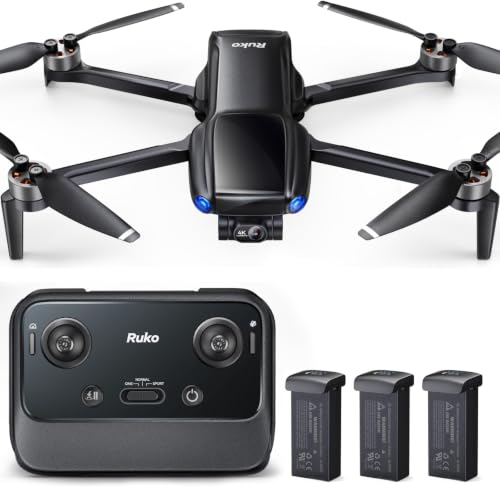
【Pocket-Sized & No FAA Needed】Weighing less than 249g, this drone is fully exempt from FAA registration. Its palm-sized, foldable design makes it the ultimate travel companion, allowing you to capture spontaneous aerial moments without the burden of heavy gear.
Essential Export Settings for Instagram Drone Clips
Hey there! If you want to share those stunning drone captures on Instagram, you’re in for a treat. But to make sure they look their absolute best, there are some essential export settings to keep in mind. For the sharpest images, stick with a square video size of 1080 x 1080 pixels, which gives you that perfect 1:1 aspect ratio.
Now, let’s talk about smooth playback. Aim for a frame rate of 29.97fps—it’s a tiny detail that makes a big difference when your viewers are scrolling through their feeds. For video encoding, use the High Profile, Level 5.1 profile, and opt for Variable Bit Rate (VBR) with 2 Pass. This approach strikes a nice balance between high quality and manageable file size. For best results, target a bitrate of around 5 Mbps, and don’t go above 7 Mbps.
And we can’t forget about sound! Use the AAC format with a sample rate of 48,000 Hz and a bitrate of 128 Kbps for those crystal-clear audio moments that really enhance your visuals. Using a memory card with V60 write speeds ensures your drone footage records smoothly without buffering or dropped frames. So next time you edit a drone video, keep these settings in mind to wow your audience on Instagram! You’re ready to make waves, so what drone shots are you looking to share next?
Recommended Products

【Compatible with DJI NEO Drone】 Compatible with DJI NEO Drone, this filter accessories kit includes an ND8, an ND16, an ND32, and an ND64 filter for professional aerial...
Debunking Myths About Drone Video Quality
Hey there! If you’re into drones and video shooting, you’ve probably heard a lot of myths about drone video quality that can be pretty confusing. For example, just because a video has a higher bitrate, it doesn’t mean it’ll look better. The codec—the way the video is encoded—and how well it’s compressed play a huge role in the final result.
Take MOV and MP4 files, for instance. Many folks swear that MOV is the way to go for better quality, but that’s not always true. Both formats can produce excellent footage, and it really boils down to the bitrate and codec you choose. Plus, if you export your footage at a higher bitrate than what you shot, you might think you’re preserving details. However, you need to watch out for bloated file sizes which can make storage a hassle.
Let’s not forget about compression artifacts. These little issues, like DCT blocking and ringing, can really mess with how your footage looks. And if you’re thinking that cranking the bitrate will fix everything when you upload to YouTube, you might want to reconsider. It’s essential to consider factors like resolution and frame rate too. So, keep these points in mind as you work on your next project; they can really make a difference in how your drone videos turn out! For best results, consider using advanced editing tools to optimize video quality during post-production.
Tips for Maintaining Quality When Compressing Drone Footage
Hey there! So, if you want to compress your drone footage without losing any of that stunning quality, I’ve got some handy tips for you. When working with drone videos, aim for a target bitrate of at least 40 Mbps using the HEVC codec—it’s a great way to find that sweet spot between file size and image clarity.
First off, try using Variable Bitrate (VBR) encoding with a two-pass method. What does that mean? It allows your editing software to analyze the footage first and then compress it more efficiently based on what’s in each scene. For instance, if you have a scene with lots of action and detail, it’ll allocate more bits there, keeping your video looking sharp.
Also, make sure your export settings match the bitrate of your drone’s recording. If you shot 4K footage with a Mini 2 at 100 Mbps, stick close to that during export for the best results. And here’s a little trick: before you render your final video, consider using some denoising techniques. This helps to clean up any noise that might pop up during compression and keeps your footage looking crisp.
Lastly, always keep those original files. It’s like having a safety net for future edits that might require better quality. You never know when you might want to go back and get the best out of that footage! Speaking of quality, let’s talk about some common mistakes to avoid when editing your drone videos.
To maintain optimal visual results during compression, also consider the drone’s stability and hovering technology, which significantly influences footage clarity.
Frequently Asked Questions
What Is a Good Bitrate for Video Compression?
Like a finely tuned instrument, we want our bitrate settings to strike a balance; using smart compression techniques, we can optimize video quality for streaming performance, ensuring minimal motion artifacts while maintaining reasonable file size and playback compatibility.
Does Higher Bitrate Mean Smoother Video?
Yes, higher bitrate usually means smoother video. We’ve seen that it enhances visual quality, improves artifact reduction, and supports frame rates and resolution effects, but it also impacts storage requirements and playback compatibility across devices.
Is 3000 Video Bitrate Good?
We’ve found that a 3000 bitrate evaluation isn’t ideal for drone footage quality. By following typical bitrate standards, we can achieve superior results, balancing visual quality tradeoffs and compression efficiency factors for better viewing experiences.
What Is Bitrate in Video Compression?
Bitrate in video compression refers to the amount of data processed per second, influencing video quality. Different compression algorithms and bitrate settings across file formats affect visual impact on streaming services and editing software. Resolution influence matters too.